
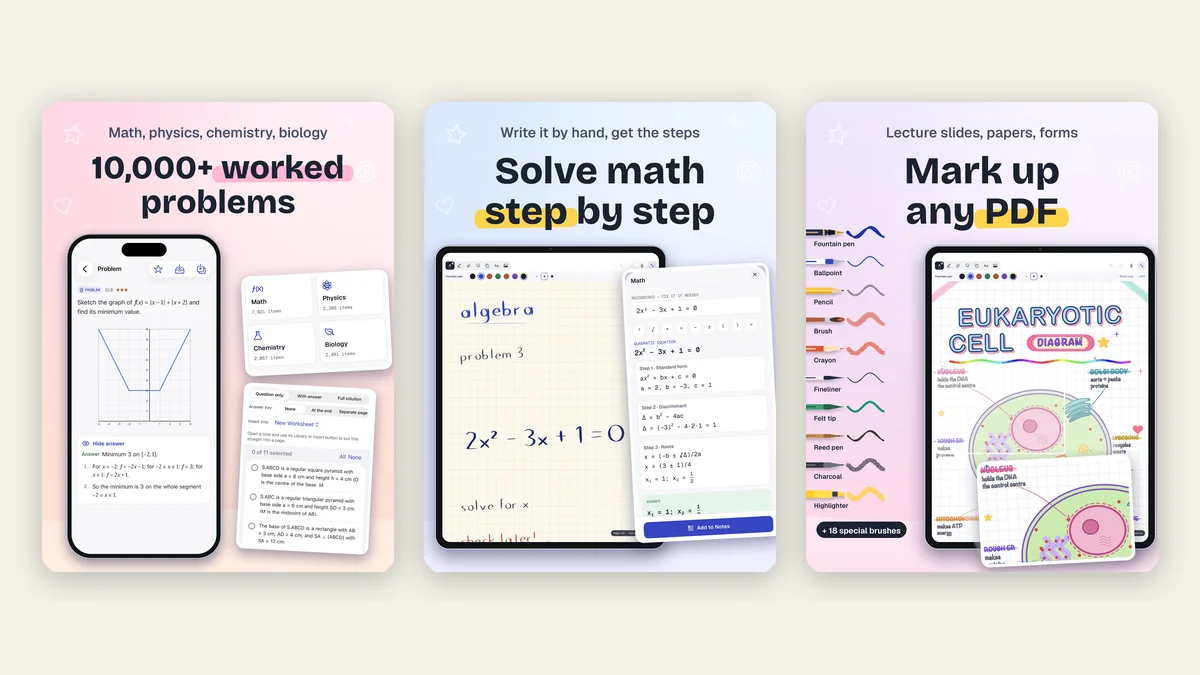
Most teachers who use Phonicademy teach more than reading. Homeschool parents cover every subject, tutors switch from phonics to fractions in the same afternoon, and ESL teachers often help with maths and science homework too. If that is you, the slow part of the week is usually the same: finding good practice problems, writing out the solutions and turning them into a clean sheet. Inkpage: Notes & PDF Markup is an iPad and iPhone notebook that doubles as a math worksheet generator, with a built-in study library of more than 10,000 worked problems in maths, physics, chemistry and biology, from grade 1 to university.
Disclosure: a sister studio made this app
Inkpage is made by Doodle Cub, a sister studio of Phonicademy. Nobody paid for this post, but we are not a neutral party, so we have kept the limits in and checked every feature against the current App Store version (2.0).
Our verdict in 30 seconds
- Best part: the study library. Search a topic ("pyramid volume", "Ohm's law", "limiting reagent"), read the formula, pick a problem and insert it into your page with no answer, with the answer, or with the full step-by-step solution.
- Also strong: the exercise generator. 300 templates make fresh numbers for the same kind of problem, so every child in a group can get a different sheet with its own answer key.
- Good for: teachers, tutors and homeschool families who plan on an iPad and want problems, notes, PDFs and Apple Pencil marking in one place.
- Watch out: the library content is in English, and full solutions, ready-made sets and printable worksheets need the one-time Pro purchase.
Inkpage at a glance
| What we found | |
|---|---|
| Devices | iPad and iPhone, iPadOS / iOS 18 or later |
| Price | Free to download. Pro is a one-time purchase, no subscription. Prices vary by country, so check the App Store. |
| Account | None. Notes stay on the device and, if you choose, in your own iCloud |
| Study content | Maths, physics, chemistry, biology; grade 1 to university; content in English |
| Worksheets | 300 exercise templates, question / answer / full solution, answer key inline or on a separate page, export to PDF |
| Other tools | Handwritten equation solver, 3D solids and graphs, 20 chart types, PDF markup, document scanner, audio notes |
| App languages | 11 interface languages, including English, Spanish, French, Japanese, Korean, Chinese and Vietnamese |
Why a phonics site cares about worked examples
The same ideas that make phonics teaching work carry over to maths and science: short, focused practice, a clear model before independent work, and quick feedback on mistakes. Two research findings explain why a bank of worked problems is more useful than a pile of answer-only worksheets.
- The worked-example effect. Sweller and Cooper (1985) found that algebra learners who studied fully worked examples before solving problems learned faster than those who only solved problems. Novices need to see the whole method first; the steps carry the learning, not just the final number.
- Retrieval practice. Roediger and Karpicke (2006) showed that testing yourself builds longer-lasting memory than re-reading. A worksheet is retrieval practice, as long as there is a fresh supply of problems the student has not seen yet.
- Fading. Combining the two, a common classroom sequence is: show a full solution, then a similar problem with only the first step, then a problem with no help. That is exactly the "I do, we do, you do" pattern we use for phonics lessons.
Inkpage supports all three: a full solution for the model, the answer plus the first step for guided practice, and "More like this" or the generator for new problems with the same method.
The study library: 10,000+ worked problems
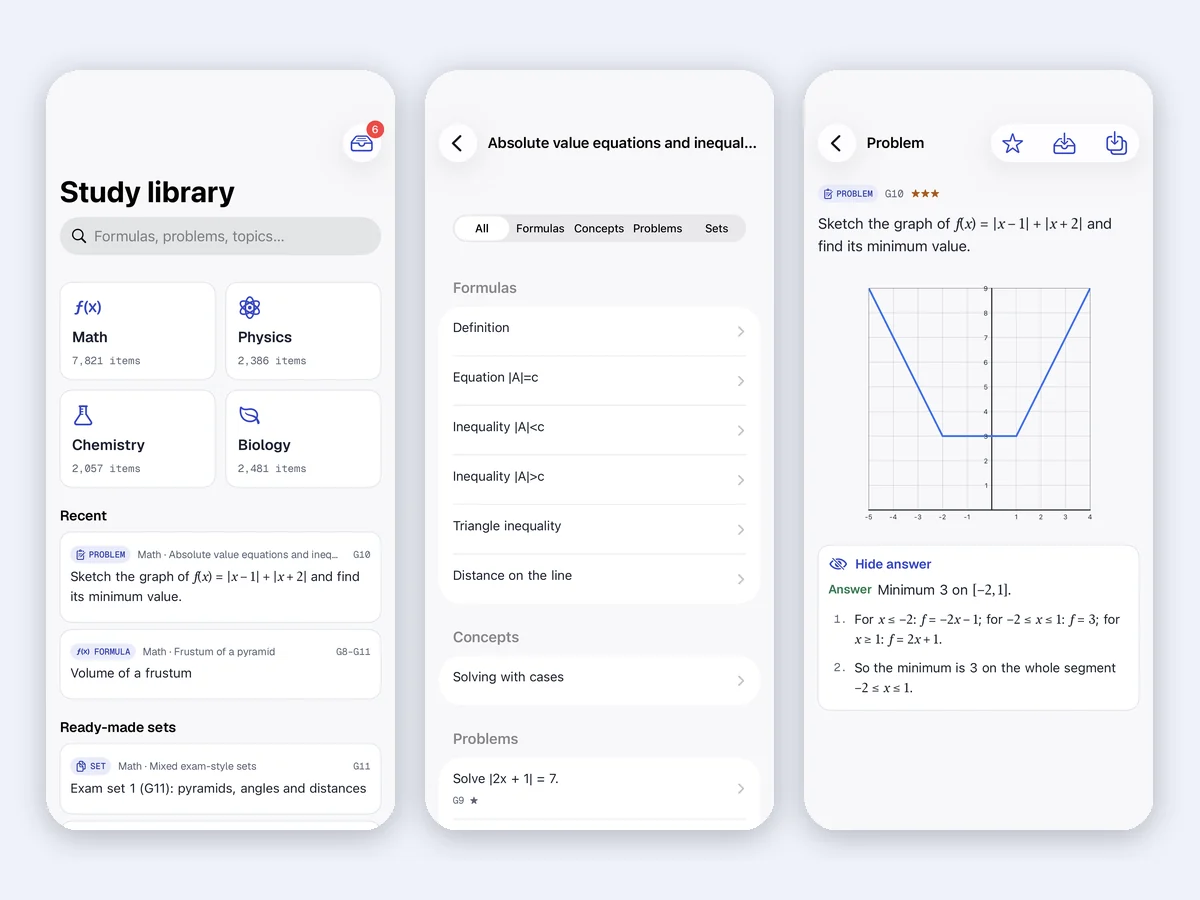
Open the library from the Library button on any page. It is organised by subject, then branch, then topic, and every topic mixes four kinds of items: formulas (with each variable named and its unit), concepts (definitions and laws in plain language), problems (with an answer and numbered steps) and ready-made sets of problems for a quick worksheet.
| Subject | Items in the library | Branches include |
|---|---|---|
| Maths | 7,821 | Number and operations, fractions and percent, algebra, functions and graphs, plane and solid geometry, trigonometry, statistics, calculus, linear algebra |
| Physics | 2,386 | Middle school energy, heat, light and electricity; high school mechanics, waves, optics, circuits, magnetism, modern physics |
| Chemistry | 2,057 | The mole, stoichiometry, gases, solutions, acids and bases, equilibrium, redox, organic chemistry |
| Biology | 2,481 | Cells, genetics and heredity, ecology, evolution, the human body, plants, scientific skills |
Every problem is tagged with a level from G1 to G12, plus two university levels, and a difficulty from one star (one formula, used directly) to three stars (multi-step, exam level). That makes it easy to stay inside a child's year group, or to step one level down when a topic needs repair.
Two details matter for teachers. First, the problems are written fresh, not copied from textbooks or released exam papers, so you can put them on a worksheet without worrying about where they came from. Second, numeric and algebraic answers are re-checked by software when the library is built; a wrong answer stops the build. Proof-style and explanation items are re-solved by hand instead.
Insert a problem the way you need it
When you insert a problem you choose Question only, With answer or Full solution, and for a group of problems whether the answer key is left out, placed at the end or put on a separate page. Figures (graphs, triangles, 3D solids, circuit or chemistry diagrams) are drawn by the app, not pasted as pictures, so they stay sharp when you print and can be recoloured or resized.
Using Inkpage as a math worksheet generator
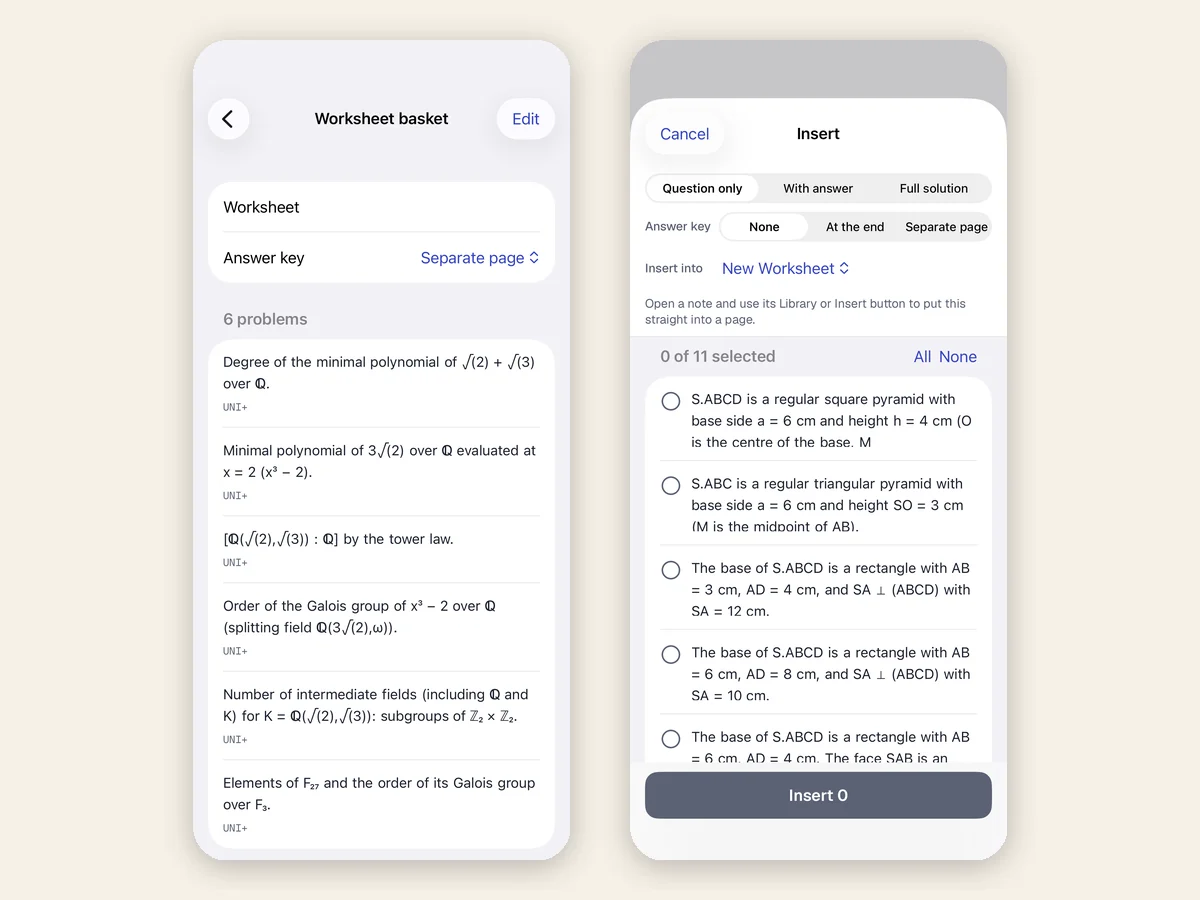
There are two ways to build a sheet. The Worksheet basket collects problems from the library as you browse, then turns them into one page or a paginated A4 PDF. The exercise generator starts from a template, such as "Solve the proportion a/b = c/x" or "Find p% of n", and fills in new numbers each time.
The generator is more careful than most free worksheet sites. Each template has number ranges for easy, medium and hard; it actually solves every problem it creates and throws away the ones that come out with awkward decimals, so answers are whole numbers or exact values. A batch never repeats a question. You can type some of the numbers yourself and leave the rest random, and a seed makes the same batch again if you lose the printout.
| Template group | Level | Example |
|---|---|---|
| Arithmetic | Primary | Calculate: 47 + 28 − 19 |
| Fractions and percent | Middle school | Add fractions; find 15% of 80; percent increase |
| Ratio and proportion | Middle school | Similar triangles; scale factor on a model |
| Linear and quadratic equations | Middle to high school | Solve 3x + 5 = 20; word problems |
| Systems and inequalities | High school | Pens and notebooks price problem |
| Exponents, logs, trigonometry, derivatives | High school to college | Solve 2^x = 32; differentiate a polynomial |
| Physics, chemistry, biology | Middle school to college | Speed and acceleration, moles, Punnett squares |
A 10-problem worksheet in five minutes
- Pick the skill. Search the library for the topic you taught today, for example "equivalent fractions" or "Newton's second law".
- Model one. Insert one problem with the full solution at the top of the page. This is your worked example.
- Add guided practice. Insert two similar problems with the answer only, or use "More like this" to get the same problem with new numbers.
- Add independent practice. Generate six to eight questions from the matching template at the right difficulty, question only.
- Set the answer key. Choose "Separate page" so you can print the questions and keep the answers for marking.
- Export. Share the page as a PDF, print it, or keep it on the iPad and let the student write on it with Apple Pencil.
One sheet per child
For a small group, generate the same template three times with different seeds. Everyone practises the same skill, nobody can copy a neighbour's answers, and each sheet still has its own key.
Formula cards for revision
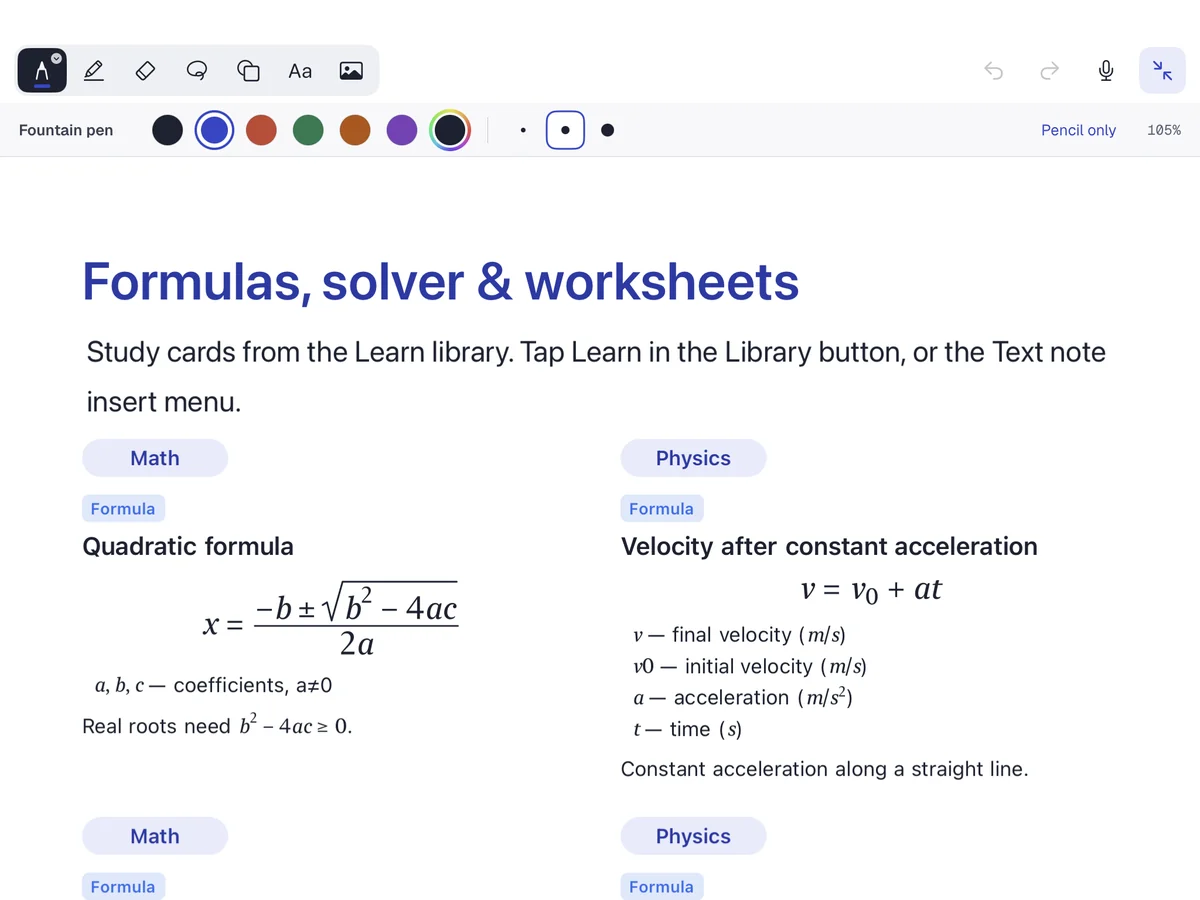
Formulas insert as tidy cards with each symbol explained, which makes a one-page revision sheet before a test very quick to build. Students who make their own card pages remember more than students who are handed one, so a good routine is to give the topic list and let them search and insert the cards themselves.
Solve math step by step from handwriting
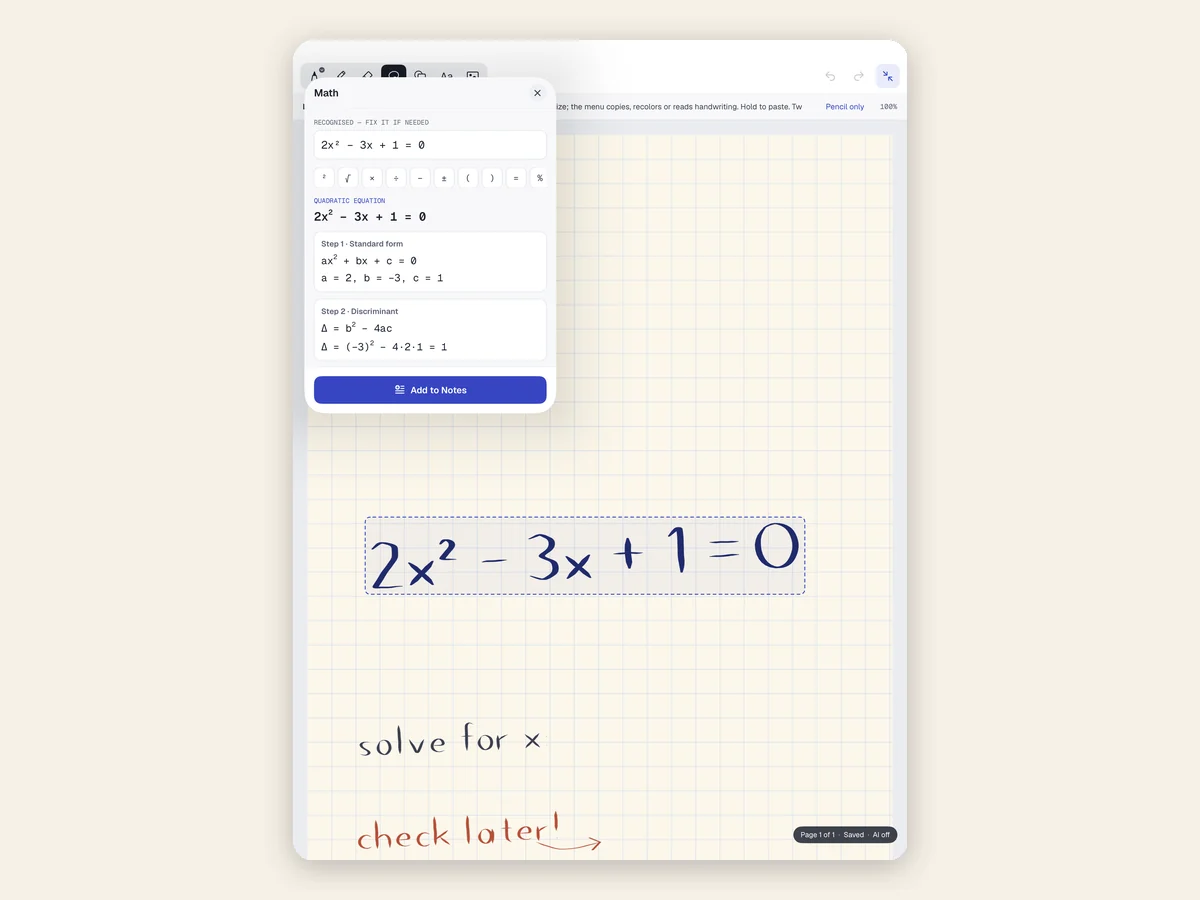
Write an equation with Apple Pencil, select it and the Math panel reads it back (you can correct it if it misread a digit), names the type of problem and shows the solution one step at a time. Free covers arithmetic, linear and quadratic equations, systems and percent; Pro adds inequalities, exponents and logs, trigonometry, calculus, matrices and vectors, statistics and probability, plus physics, chemistry (moles, pH, balancing equations) and biology (Punnett squares, Hardy–Weinberg).
Use it as a checker, not a shortcut. The habit we recommend: the student solves on paper or on the page first, then runs the solver and compares their steps with the app's. The first line where the two differ is the line to talk about.
Shapes, 3D solids, graphs and charts
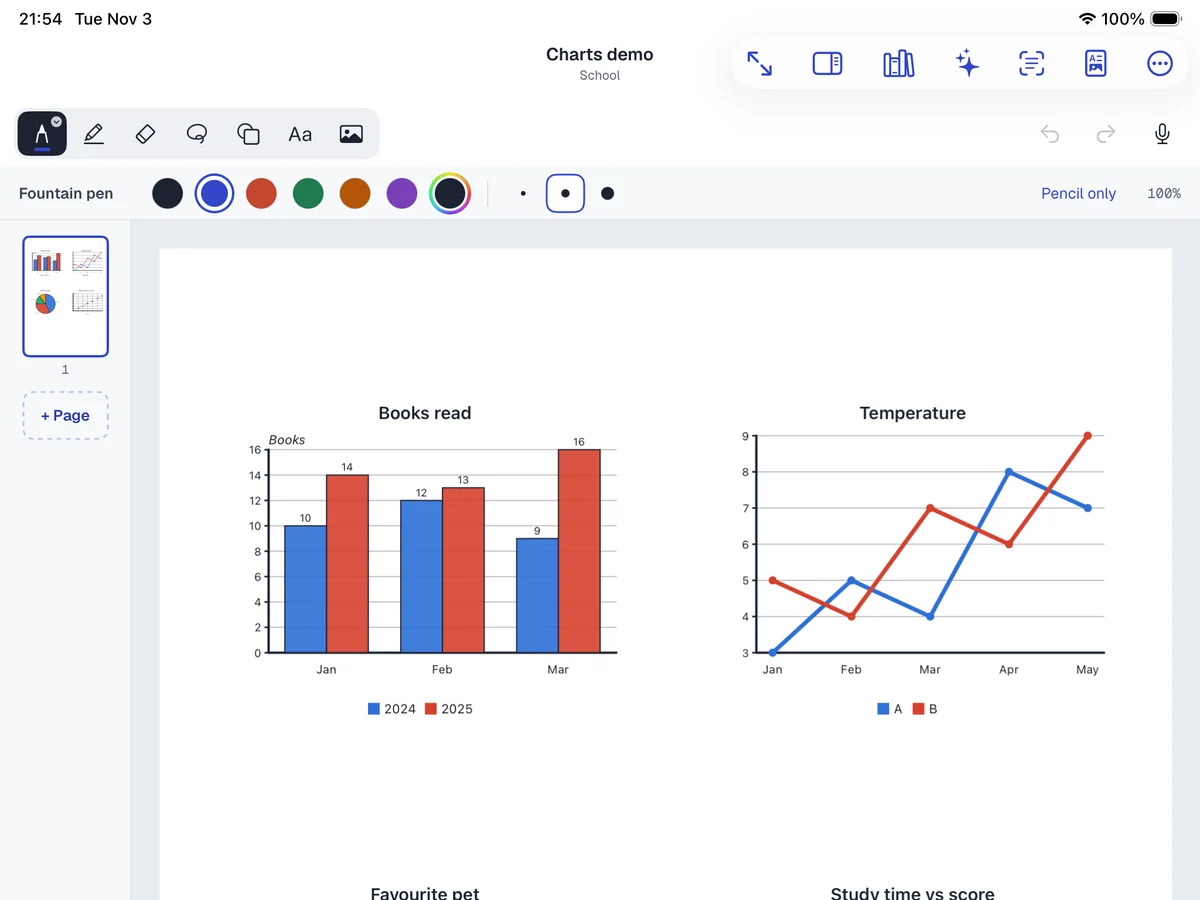
The Library also has 2D shapes, labelled 3D solids, function graphs, science diagrams and maps that can be resized, recoloured and rotated, and 20 chart types (bar, line, pie, scatter, histogram, box plot, Venn and more). For statistics lessons, paste a small table of class data and the chart redraws whenever the numbers change.
Notes and PDFs: where Phonicademy printables fit
Inkpage is also a full notebook, which is why it works as a single planning app. Import a PDF and write on every page with Apple Pencil, type anywhere on the page, and record audio while you write, then tap a line to hear what was said. The camera scanner turns a paper worksheet into a searchable PDF, so a child's finished sheet can be filed and found later.
That makes it a good home for our own printables. Download a phonics pack such as the Letter Sounds Pack or the Blending Practice Worksheet, open the PDF in Inkpage and let your child trace and write straight onto it. For literacy worksheets you build from scratch, our free worksheet maker runs in the browser; Inkpage covers the maths and science side.
Privacy for students and schools
- No account to create and no sign-in. Notes are saved on the device, and sync only through your own iCloud if you turn it on.
- AI features (search by meaning, summaries, transcription) run on the device on supported models. Nothing is sent to a server, and you choose which workspaces AI may read. AI is off until you turn it on.
- Private pages or whole workspaces can be locked with Face ID or a passcode and hidden from search and widgets, useful for pupil records or grades.
- A full backup is a .zip of Markdown, PDFs and pictures, free, so your material is never locked inside the app.
Free vs Pro: what you actually get
| Free | Pro (one-time purchase) | |
|---|---|---|
| Study library | Browse, search and read every formula, concept and question; see each answer with its first step; insert questions, answers and formulas | Full step-by-step solutions, ready-made problem sets, "More like this", worksheets to a page or PDF |
| Exercise generator | 25 templates (arithmetic, fractions, percent, equations, systems), 3 generated exercises a day | All 300 templates, unlimited exercises, your own custom templates, Worksheet page and PDF |
| Handwriting solver | Arithmetic, linear and quadratic equations, systems, percent | Advanced maths, physics, chemistry and biology solvers |
| Notes and PDFs | Typed and handwritten notes, PDF markup, scanner, charts, backup | Every pen, brush and template, handwriting and PDF search, export with your marks and to Word, Excel and PowerPoint |
Pro is a single purchase with no subscription, so there is nothing to cancel. The price differs by country; the App Store shows yours before you buy.
Honest cons
- English content only. The app itself is translated into 11 languages, but the problems, formulas and solutions are in English. For ESL students that can be a bonus (maths vocabulary practice) or a hurdle.
- The best teaching features are Pro. Free is enough to try the library and check answers, but full solutions and printable worksheets need Pro.
- Answers are one tap away. A student working in the library can open the answer. For independent practice, insert "Question only" onto the page and keep the key yourself.
- Apple only. There is no Android or web version, and it needs iPadOS / iOS 18 or later.
- A pencil makes the difference. It works with a finger, but handwriting, marking and the solver are far better with Apple Pencil.
A one-week plan for a tutor or homeschool
| Day | Model (5 min) | Practice (10–15 min) | Check (5 min) |
|---|---|---|---|
| Mon | One library problem with the full solution | 3 "More like this" problems, answer only | Compare steps with the model |
| Tue | Formula card for the topic, built by the student | Generator: 8 questions, easy | Answer key on a separate page |
| Wed | Re-read Monday's solution aloud | Generator: 8 questions, medium | Handwriting solver to find the first wrong line |
| Thu | Mixed: two topics side by side | A ready-made set at the year's level | Mark with Apple Pencil, re-do two misses |
| Fri | None (no help today) | A fresh 10-question sheet from a new seed | Score it; log weak topics for next week |
Keep each session short. A daily 20–25 minutes with a model, practice and a check beats one long session at the weekend, the same rule we give for phonics practice at home.
Which part of Inkpage for which stage
| Stage | Use first | Pair it with |
|---|---|---|
| Grades 1–5 | Arithmetic, fractions and measurement templates; Question only | Concrete objects and paper; read word problems aloud |
| Grades 6–8 | Ratio, percent, equations; library problems with the first step shown | "More like this" until three in a row are right |
| Grades 9–12 | Full solutions as models, then exam-style sets at two or three stars | Formula cards for revision; the solver to check work |
| University | UNI topics: linear algebra, calculus, organic chemistry, genetics | Lecture PDFs marked up in the same notebook |
Is Inkpage the right math worksheet generator for you?
If you plan lessons on an iPad and want problems, solutions, worksheets and your own notes in one place, yes. The study library and the generator save real time, the answers are checked, the problems are original, and there is no account or subscription to manage. If you need content in another language, work on Android or only print a sheet once a month, a browser tool will do.